How to rank number 1 on Google Maps in India? Pick the most accurate business category, complete every part of your profile, collect genuine reviews steadily (WhatsApp works best), keep your name, address and phone identical everywhere, and post every week. Google ranks the profile it trusts most for relevance, distance and prominence — consistency wins the top spot.
Everyone wants the top spot. When a customer searches and your business shows up first on the map, the calls just start coming. That’s why every shop owner eventually asks the same thing.
Of course, there’s no magic button. However, there is a clear path. We’ve seen small businesses go from invisible to the top three in a couple of months by doing a handful of things properly. Here’s exactly what works, step by step.
How Google Decides Who Ranks Number 1 on Google Maps
Google’s own guide on how to improve your local ranking says Maps results are based on three things: relevance (how well your profile matches the search), distance (how close you are to the searcher) and prominence (how well-known and trusted you are — reviews, ratings and mentions across the web).
Of course, you can’t move your shop closer to every customer, but you can control relevance and prominence. Therefore, every step below improves one of them.
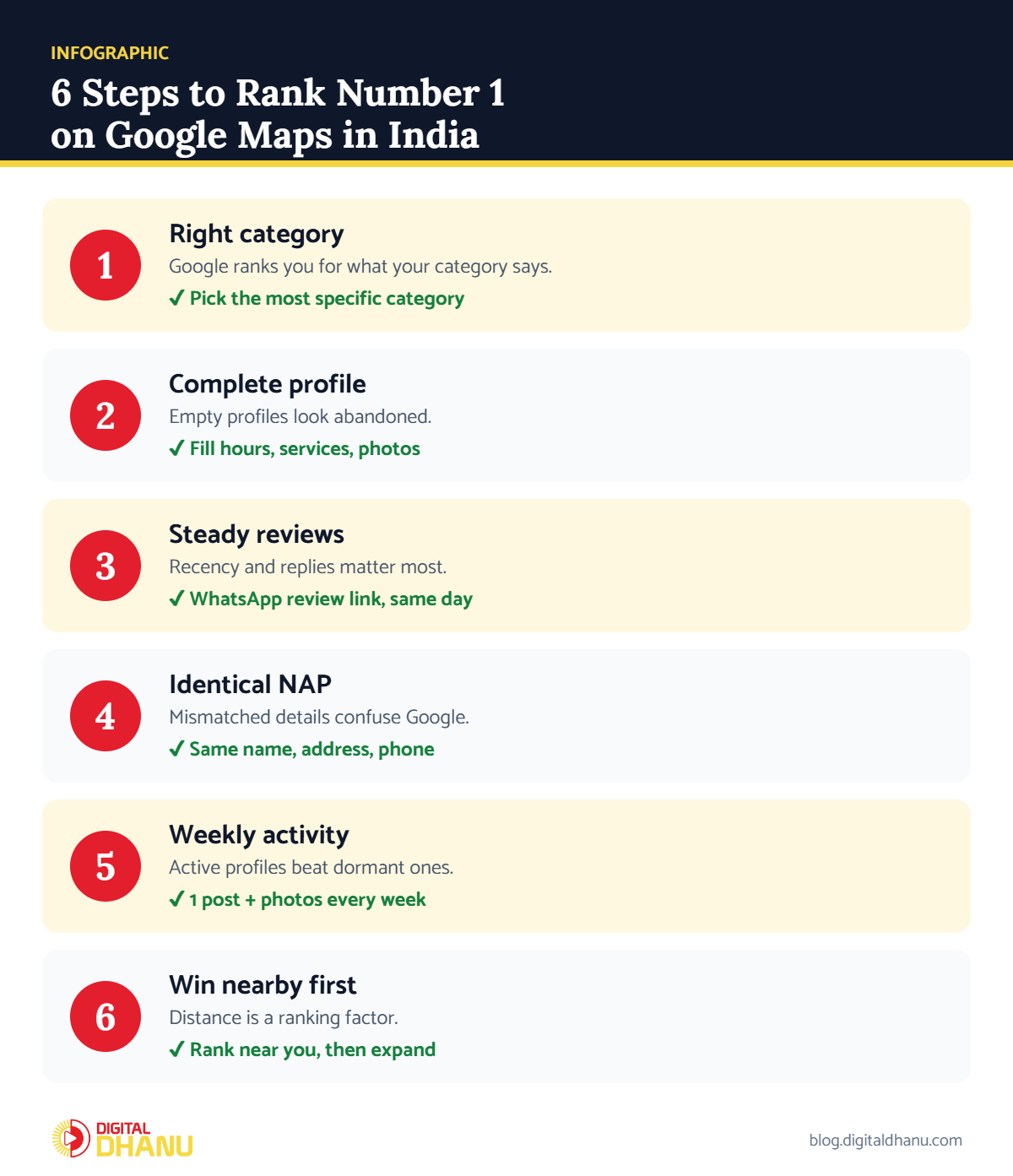
Step 1: Start With the Right Category
In fact, this is where most businesses lose before they begin. If you run a dental clinic but your category says “Clinic”, you’re competing for the wrong searches. As a result, Google ranks you for what your category says you are.
✅ The fix: Check the primary category of the top-ranking competitor in your area, then pick the most specific one that truly fits you. Google’s help on choosing your business category explains the options.
Step 2: Complete Every Single Field
Google trusts a profile that looks finished. On the other hand, an empty profile looks abandoned.
- Business hours — exact, including holiday hours.
- Services and products — list them all, with short descriptions.
- Photos — real ones of your shop, team and work, added regularly.
- Description — mention your city and main services naturally.
✅ The fix: So open your profile and fill every empty section today. New to this? Follow our guide on setting up a Google Business Profile in India.
Step 3: Make Reviews Your Ranking Engine
Above all, reviews move the needle most. However, it’s not just the number — how recent they are, and whether you reply to them.
In particular, the trick in India is WhatsApp. After you serve a happy customer, send your review link on WhatsApp the same day. People reply on WhatsApp far more than on email. Also, a steady flow of fresh reviews tells Google you’re active and trusted.
✅ The fix: Then send your Google review link on WhatsApp to every happy customer the same day, and reply to every review. Our guide to Google Business Profile reviews has message templates.
Need help right now?
Send your business name on WhatsApp and we’ll take a quick look at your ranking — free.
Step 4: Keep Your Details Identical Everywhere
Your business name, address and phone must match exactly across Google, JustDial, Sulekha, IndiaMART and your website. Even small differences confuse Google and, as a result, hold your ranking back.
✅ The fix: First, pick one exact format for name, address and phone and update every listing to match. See more quick wins in our local SEO tips for Indian businesses.
Step 5: Stay Active Every Week
Post something on your profile weekly — an offer, a photo, a quick update. After all, active profiles beat dormant ones. Besides, it takes ten minutes and keeps you visible.
✅ The fix: For example, set a weekly 10-minute reminder to add one post and two photos. Google’s guide to creating posts on your Business Profile shows how.
Step 6: Rank Number 1 on Google Maps Near You First
Since distance is the one factor you can’t change, so don’t panic if you’re not number 1 across the whole city. Aim to be number 1 for searches near your shop first, then widen your reach as reviews and authority grow.
✅ The fix: Also, check your ranking from different spots around your area, not just from your own phone. If you’re not showing at all, start with why your business is not showing on Google Maps.
Factors to Rank Number 1 on Google Maps at a Glance
| Factor | Google signal | What to do | Impact |
|---|---|---|---|
| Primary category | Relevance | Most specific matching category | Very high |
| Complete profile | Relevance | Fill every field, add services | High |
| Reviews & replies | Prominence | Steady WhatsApp review requests | Very high |
| NAP consistency | Prominence | Same name, address, phone everywhere | High |
| Weekly posts & photos | Prominence | 10 minutes every week | Medium |
| Location | Distance | Rank near you first, then expand | Fixed |
Checklist to Rank Number 1 on Google Maps
Tick these off before you expect the top spot:
- Most specific primary category selected
- Every field filled — hours, services, photos, description
- A weekly review routine on WhatsApp
- Identical NAP on Google, JustDial, Sulekha and website
- One post and fresh photos every week
Key takeaway: Learning how to rank number 1 on Google Maps in India isn’t about one big trick — it’s six small things done consistently: right category, complete profile, steady reviews, matching details, weekly activity and winning nearby searches first.
Want to Rank Number 1 on Google Maps Faster?
Of course, getting to the top takes consistent work, and that’s exactly what we do all day. Our detailed guide on ranking on Google Maps in India goes deeper into each factor.
Digital Dhanu has helped over 1,300 Indian businesses climb Google Maps. Our Google Business Profile optimisation service does the heavy lifting — or book a free consultation to see what it will take in your city.

Written by the Digital Dhanu GMB Team
Google Business Profile & Local SEO specialists based in Noida. 1,300+ businesses helped across India, Dubai and Australia since 2019.
Let’s Get You to the Top
So tell us your business and city — we’ll show you exactly what it will take to reach number 1.
Get a Free Google Maps Ranking Check
Talk to a GMB expert today — honest advice, no pressure.
Frequently Asked Questions
How long does it take to rank number 1 on Google Maps?
Usually 1 to 3 months in lower-competition areas, while it takes longer for busy city categories. In addition, consistent reviews and weekly activity speed it up.
Can I rank number 1 without paying Google?
Yes. In fact, Google Maps ranking is organic and free. You only pay if you choose expert help or run separate ads.
Do reviews really decide Maps ranking?
They’re one of the strongest factors, especially recent, genuine reviews with replies. As a result, they build the prominence Google looks for.
Does posting weekly actually help ranking?
Yes. Active profiles signal that your business is open and relevant, which supports higher ranking and more clicks.
Why do I rank number 1 at my shop but not elsewhere in the city?
Distance is part of Google’s ranking. You’ll naturally rank higher near your location; stronger reviews and authority help you rank further away.