


How to Rank on Google Maps in India – 2026 Guide
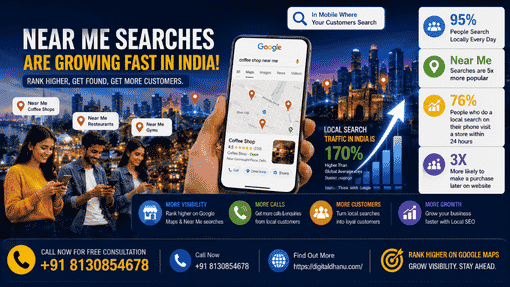
Ranking on Google Maps in India is one of the best things a business can do to grow. If your business shows up in the top three spots on Google Maps, you get seen by people who want to buy from you soon. Most searches in India happen on Google, and “near me” searches are growing fast. That means showing up on Google Maps is not a choice anymore. It is something you must do. This complete guide on How to Rank on Google Maps in India will help you understand the exact strategies businesses use in 2026 to improve local SEO, increase visibility, and get more customers from Google Maps.
| 95% Google’s India Search Share | 3 Local Pack Spots | 76% Visit After Local Search | Near Me Fastest Growing Indian Search |
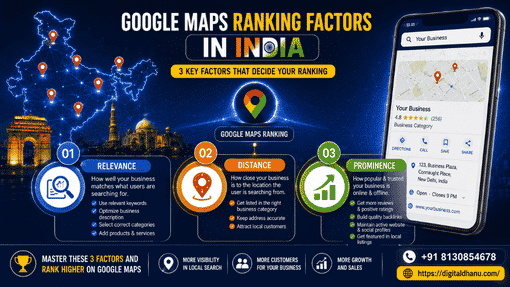
How Google Determines Maps Rankings in India
To understand How to Rank on Google Maps in India, you first need to know the three main ranking factors Google uses for local search results.
Factor 1 — Relevance
Google checks how well your Google Business Profile fits what people want. If a person in Delhi searches for a chartered accountant in Lajpat Nagar, Google looks at your business type, the words in your description, your service list, and your questions and answers.
Factor 2 — Distance
Google looks at how near your business is to the person searching, or the place they search for. If someone types coffee shop near me in Bandra, Google will show coffee shops that are close to them first.
Factor 3 — Prominence
Prominence means how strong your business is online. In India, it covers your Google reviews. It is also about your listings on JustDial and Sulekha, links to your site from Indian websites, your Google Business Profile activity score, and how much your business shows up in India’s digital system.

| 📊 Google Maps Ranking Signals for Indian Businesses (2026) Google Business Profile completeness — 32% of local pack ranking weight Review signals (quantity, rating, recency, responses) — 16% of weight On-page website signals (local content, schema markup) — 16% of weight Behavioural signals (clicks, calls, direction requests) — 10% of weight Link signals (Indian backlinks, domain authority) — 11% of weight Citation signals (JustDial, Sulekha, IndiaMart, Yellow Pages India) — 7% of weight Proximity and personalization factors — 8% of weight |
Step-by-Step Guide How to Rank on Google Maps in India
Step 1 — Claim and Verify Your Google Business Profile
If you have not claimed your Google Business Profile yet, do it today at business.google.com. If your Indian business has a listing, claim it and If there is no listing, you can make a new one. In India, your verification process is usually by postcard. It will come in about 5 to 14 days. It can also happen by phone call or email, based on your type of business.
Step 2 — Choose the Right Primary Category
Your main category helps your business rank better. In India’s market, it is very important to choose the right category. There is often a category that fits your business best.
Step 3 — Write a Complete, Keyword-Rich Business Description
You need to write a business description between 250 and 750 words. Try to use your main keywords in the text. Use words like your city or area, what you do, and what makes your business stand out. But do not put in too many keywords at once.
Step 4 — List All Your Services
The Services section in your Google Business Profile is where you can add all the things you do. You need to write the name of each service and give a short description. This way, you have a good chance to show up more when people look for what you do online.
Step 5 — Upload Professional Photos
| 📋 Step-by-Step Process Step 1: Upload your business logo as your profile icon Step 2: Add a strong cover photo that represents your brand Step 3: Upload interior and exterior photos of your location Step 4: Add team and people photos to build human connection Step 5: Upload product or work photos to showcase what you do Step 6: Add new photos at least twice per month to maintain freshness |
Step 6 — Build Your Google Reviews
Reviews are the best way to help your Google Maps ranking go up in India. Make a plan to get more reviews:
- Make a simple Google review link for your business. Share it with all your customers.
- Ask for reviews right after a good customer visit. The right time matters.
- Send a follow-up WhatsApp text with your review link. WhatsApp is the top app that people use to chat in India.
- Reply to every Google review in one to two days.
- Do not give rewards for reviews. It is against Google’s rules.
Step 7 — Post Weekly on Google Business Profile
Active profiles show up higher than those that are not updated. Try to post every week. Share offers, tips, news, or updates that speak to your audience in India. Talk about local festivals, seasons like monsoon, summer, and winter, or events around you.
Step 8 — Build Indian Directory Citations
List your business on all top Indian directories. Make sure your name, address, and phone number are the same everywhere.
- JustDial — India’s biggest local business directory. It is a must-have for all Indian businesses.
- Sulekha — A top Indian service marketplace. It has a strong local SEO presence.
- IndiaMart — A B2B platform with strong website power. This one is good for B2B businesses.
- Yellow Pages India (asklaila.com) — A well-known directory that gives good citation value.
- TradeIndia — A B2B directory. It matters most for factories and trade businesses.
- Yelp India — A platform that is growing fast. It is now getting more well-known in India.
Google Maps Ranking Timeline for Indian Cities
| ⏱️ Expected Ranking Timeline by Indian Market Delhi NCR (Competitive) — 90 to 180 days for three-pack in most categories Mumbai (Very Competitive) — 90 to 180 days, longer for prime South Mumbai Bangalore (Competitive) — 60 to 120 days depending on area and category Hyderabad, Chennai, Kolkata — 45 to 90 days in most categories Pune, Ahmedabad — 30 to 75 days — less competitive, faster results Tier 2 Cities (Jaipur, Lucknow) — 30 to 60 days — excellent ROI Tier 3 Cities — Often 15 to 30 days — very low competition, fast rankings |
Let Digital Dhanu Improve Your Google Maps Ranking in India
Digital Dhanu works on Google Maps ranking for Indian businesses in every city. You can call us at +91 8130854678 or go to digitaldhanu.com. Start your Google Maps ranking with us, and get a free checkup.

Frequently Asked Questions
Q1. Does my business need a physical address in India to appear on Google Maps?
You need either a verified physical address or a defined service area. Service-area businesses — like plumbers, electricians, tutors, or event photographers — can hide their home address and define the areas they serve. They can still rank on Google Maps for local searches in their service areas.
Q2. How important are WhatsApp and Indian apps for Google Maps ranking?
WhatsApp itself does not directly affect Google Maps rankings, but it is India’s most effective tool for review generation, which directly impacts rankings. A WhatsApp-based review request strategy can dramatically accelerate your review growth in Indian markets.