How do you fix a suspended Google Business Profile? First find the cause — often a keyword-stuffed name or a wrong address — then correct it fully, and finally submit one reinstatement appeal to Google with proof that your business is real. A suspended Google Business Profile takes patience to recover; however, Google does reinstate most genuine businesses.
One day your profile is bringing calls. The next, it’s gone — suspended, with no clear reason. As a result, your customers can’t find you, and panic sets in.
Take a breath. In most cases, it’s recoverable. So here’s why it happens and exactly what to do, step by step.
Suspended vs Disabled: Know What You’re Dealing With
Google now uses two labels. Google usually keeps a suspended profile but restricts or hides it because of a guideline issue. By contrast, Google takes a disabled profile down for more serious policy violations. In both cases, Google’s own guide to fixing suspended or disabled profiles is the official starting point.
Therefore, check the exact notice in your profile and email before doing anything else.
Why a Google Business Profile Gets Suspended
Google doesn’t suspend profiles randomly; instead, there’s almost always a trigger. The most common ones are:
- Keyword-stuffed name — adding services or the city into your business name.
- Address issues — a fake, virtual or mismatched address.
- Sudden big edits — changing name, address or category all at once.
- Policy violations — breaking Google’s guidelines for representing your business.
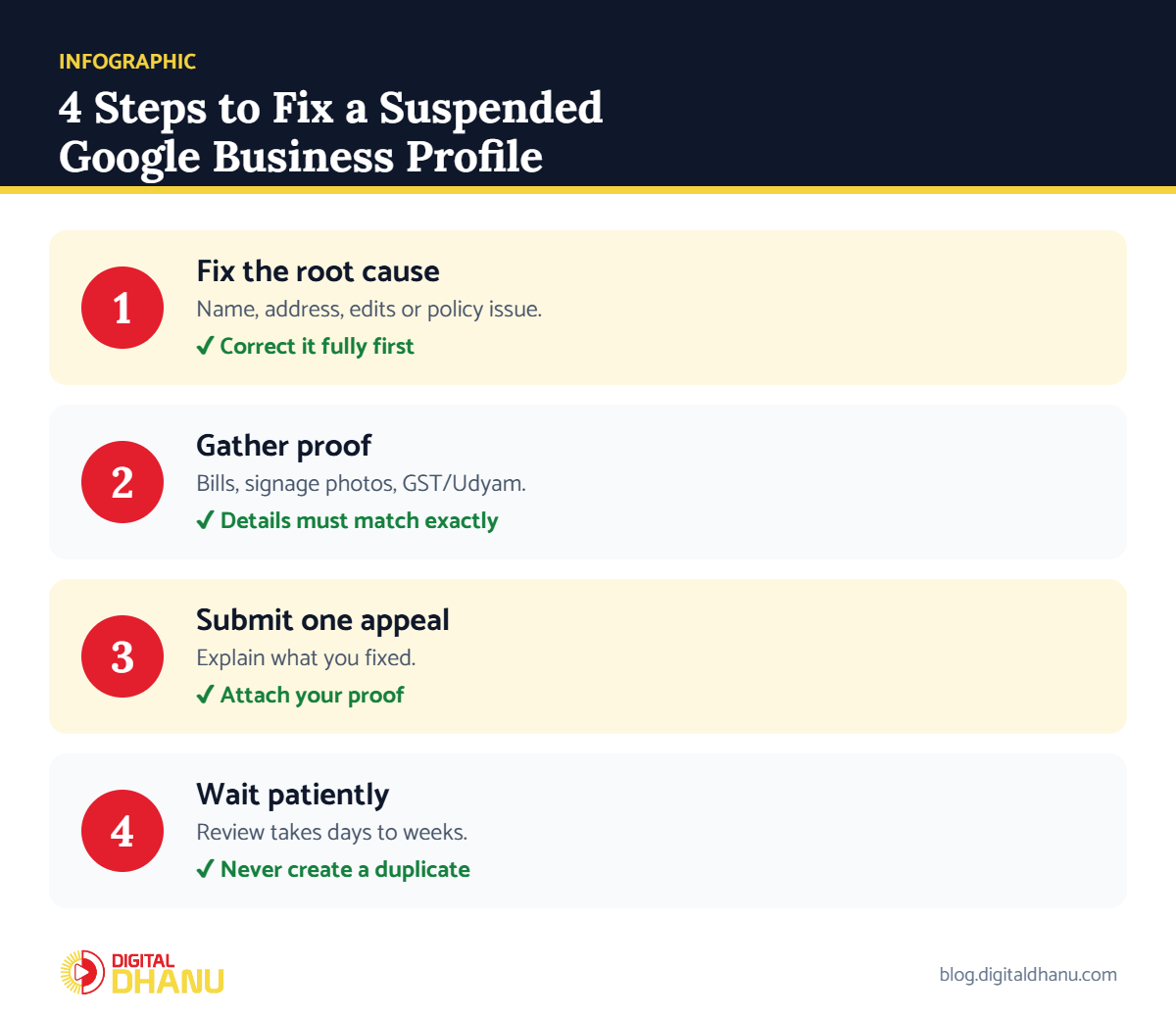
Step 1: Fix the Root Cause of the Suspended Google Business Profile
Don’t rush to appeal before fixing the problem. For example, if you keyword-stuffed your name, change it to your real business name only. Similarly, if the address was wrong, correct it. Google won’t reinstate a profile that still breaks the rules.
✅ The fix: Go through your profile line by line and bring everything in line with Google’s guidelines before you appeal.
Step 2: Gather Proof Your Business Is Real
Next, collect documents that prove your business exists at that address:
- Proof of address — a utility bill or rent agreement in the business name.
- Photos — your storefront with permanent signage, and the interior.
- Registration — GST certificate, Udyam registration, shop licence or similar.
✅ The fix: Make sure the name and address on every document match your profile exactly.
Profile suspended right now?
WhatsApp us your situation — we’ll tell you the fastest safe way to recover, free.
Step 3: Submit One Reinstatement Appeal
Once you’ve fixed everything, submit your appeal through Google’s official appeals process linked from your profile or the help page. Explain briefly what was wrong and what you corrected, then attach your proof.
✅ The fix: Submit one clear, honest appeal. Multiple appeals or duplicate profiles only slow things down.
Step 4: Wait Patiently — and Don’t Create a New Profile
Reinstatement isn’t instant, though. It can take a few days to a few weeks while Google reviews your case. Meanwhile, don’t create a duplicate profile — that makes things worse and can lead Google to remove both.
Suspended Google Business Profile: Causes and Fixes
| Cause | What Google sees | Fix before appeal | Proof to attach |
|---|---|---|---|
| Keyword-stuffed name | Name doesn’t match signage | Use real business name only | Signboard photo |
| Virtual/fake address | No real premises | Use real address or hide it (service area) | Utility bill, rent agreement |
| Many edits at once | Suspicious activity | Revert to accurate details | Registration documents |
| Duplicate profiles | Two listings, one business | Keep one, remove other | Proof of ownership |
| Wrong category/policy issue | Guideline violation | Correct category and content | Photos of work |
Checklist Before You Appeal a Suspended Google Business Profile
Tick every box before you hit submit:
- Read the exact suspension notice (suspended or disabled)
- Business name matches your real signage
- Address is real and exact (or hidden for service-area businesses)
- Proof documents and photos ready
- No duplicate profile created
Key takeaway: A suspended Google Business Profile is usually fixable: find the real cause, correct it fully, submit one honest appeal with proof, and wait. Above all, don’t create duplicates.
Suspended and Stuck? We Can Help
We’ve also covered real recovery cases in our guide on what to do when your Google Business Profile is suspended. And if your profile is live but hidden, read why your business is not showing on Google Maps.
Reinstatement is fiddly, and one wrong move can set you back weeks. Digital Dhanu has recovered suspended profiles for businesses across India. Explore our Google Business Profile service or book a free consultation.

Written by the Digital Dhanu GMB Team
Google Business Profile & Local SEO specialists based in Noida. 1,300+ businesses helped across India, Dubai and Australia since 2019.
Get Your Profile Back Safely
Message us your situation and we’ll tell you the fastest safe way to recover — before you submit anything.
Get Free Suspension Recovery Advice
Talk to a GMB expert today — calm, clear next steps.
Frequently Asked Questions
How long does reinstatement take?
Usually a few days to a few weeks, depending on your case and the proof you provide. Therefore, patience is key.
Will I lose my reviews after suspension?
Usually not. In most cases, your reviews return once Google reinstates the profile, because they belong to the listing.
Can every suspended profile be recovered?
Google reinstates most genuine businesses once they fix the cause. However, profiles that clearly broke serious rules are harder to recover.
Should I make a new profile instead?
No. Creating a duplicate usually makes things worse. Instead, fix and appeal the existing one.
What’s the most common reason for suspension?
In India, keyword-stuffing the business name and address problems are the two most common triggers.