How do you set up Google Business Profile in India? Go to business.google.com with a business Google account, add your exact business name and the most specific category, enter your address (or service area), phone and website, then verify — usually by video in India. Finally, complete every field with photos, hours and services. When you set up Google Business Profile this way, you start ranking much faster.
Setting up your profile properly is the most important step if you want customers to find your Indian business on Google Maps. Done well, it brings calls, directions and walk-ins for years. Done badly, however, it can take months to fix.
Most setup guides are written for everyone in the world. This one, by contrast, is written for India — with the address format, WhatsApp, verification and category tips that actually matter here.
Before You Set Up Google Business Profile: What You Need
First, keep these ready so you don’t have to stop halfway:
- A business Google account — ideally a business email, not your personal Gmail.
- Your exact business name — exactly as written on your signboard and GST/Udyam documents.
- Address and pin code — the same format you use on JustDial, IndiaMART and your website.
- A working phone number — plus your WhatsApp number and website, if you have them.
- 10+ real photos — storefront with signage, interior, team and your work.
Step 1: Create or Claim Your Profile
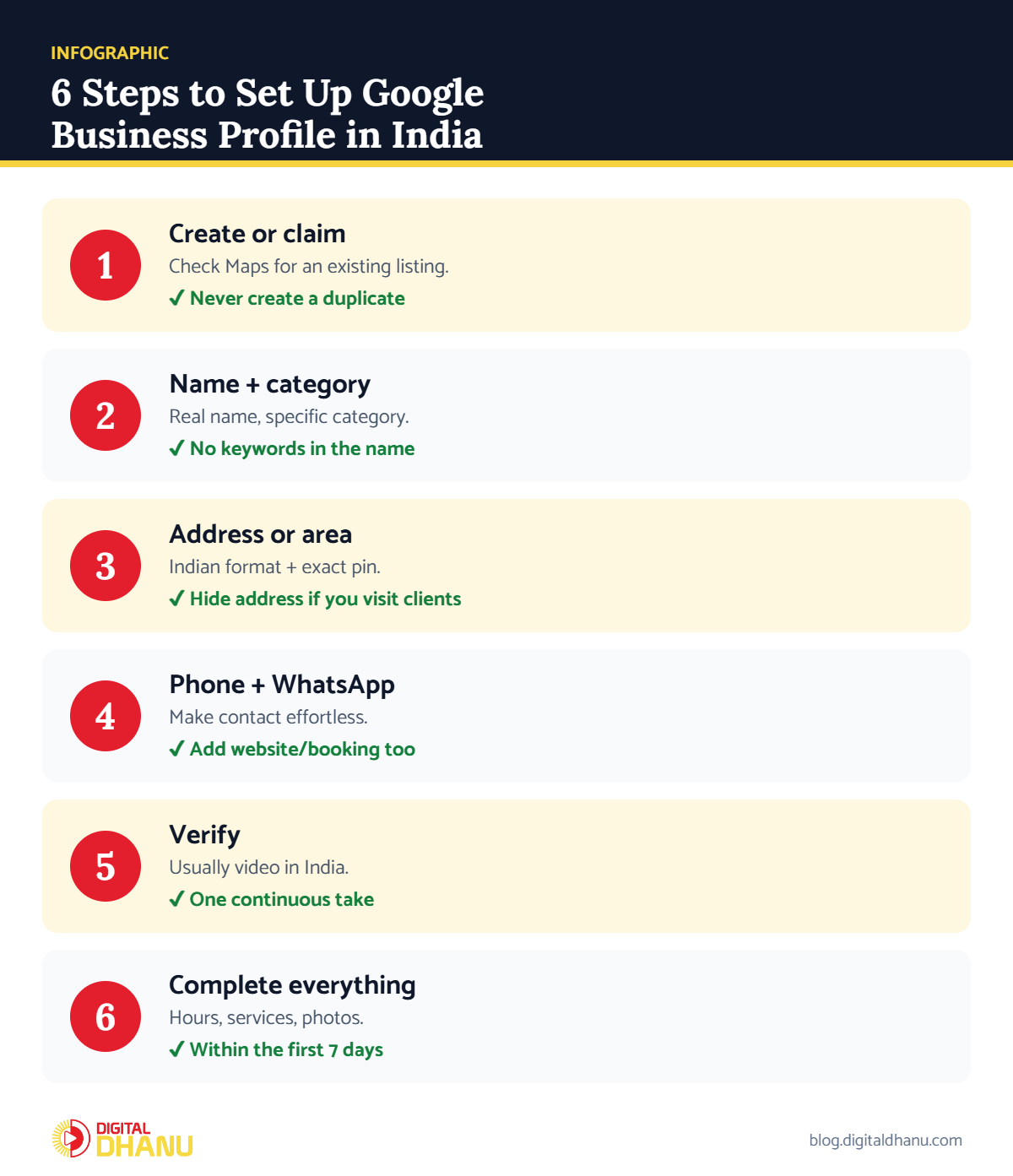
First, go to business.google.com and sign in. Then search your business name — Google may already have a listing for you. If it does, claim it instead of creating a new one, because duplicates cause ranking and verification problems.
✅ The fix: Before creating anything, search by name and phone number on Google Maps. If a listing exists, use “Claim this business” on it. Google’s getting started guide covers both paths.
Step 2: Choose the Right Name and Category
Above all, use only your real business name — never add services or the city to it, because that’s the most common reason profiles get suspended in India. Then choose the most specific primary category that describes what your business is.
✅ The fix: For example, check the primary category of the top 3 businesses for your main keyword on Google Maps, and pick the one that truly fits you.
Step 3: Add Your Address or Service Area
If customers visit you, add your full address in the Indian format: shop/flat number, building, street, area, city, state and pin code. However, if you visit customers instead (for example, a plumber or home tutor), hide your address and add a service area. Google’s guide to service-area businesses explains the rules.
✅ The fix: Also, drop the map pin exactly on your entrance — a wrong pin sends walk-in customers to the wrong place.
Want it set up correctly the first time?
WhatsApp us your business name — we’ll check your listing and setup for free.
Step 4: Add Phone, WhatsApp and Website
To start, add your main phone number, and then your website or booking link. Where the option is available, also add WhatsApp or chat as a contact method — most Indian customers prefer messaging before they call.
Step 5: Verify Your Google Business Profile
Usually, Google decides which verification method you get. In India, most businesses are asked to record a short video showing the street, permanent signage and proof that they manage the business. Others may get phone, SMS or email codes.
✅ The fix: For example, record one continuous video: start outside with the street and signboard, walk inside, and show tools, stock or a bill book. Full steps are in how to verify Google Business Profile in India.
Step 6: Complete Every Field in the First 7 Days
After verification, fill in everything: hours (including holidays), services with short descriptions, products, attributes like UPI payments, and a natural description of what you do and where. Finally, add real photos — not stock images.
✅ The fix: Next, follow how to optimize your Google Business Profile to start ranking.
Common Mistakes When You Set Up Google Business Profile
| Mistake | What happens | Do this instead |
|---|---|---|
| City/keywords in business name | Risk of suspension | Use your real name only |
| Creating a duplicate listing | Split reviews, verification issues | Claim the existing listing |
| Virtual office or fake address | Suspension or failed verification | Use a real address or service area |
| Personal Gmail as owner | Lost access when staff leave | Use a business account, add managers |
| Stock photos | Lower trust and clicks | Upload real photos of your business |
| Leaving fields empty | Weaker ranking | Fill every field in week one |
Set Up Google Business Profile Checklist
Tick these off and your profile is ready to rank:
- Real business name matching your signboard
- Most specific category chosen
- Exact address and map pin (or service area)
- Verification completed
- Hours, services, photos and description added
Key takeaway: Set up your profile once, carefully: real name, exact category, accurate address, completed verification and every field filled. That foundation decides how fast you rank.
Want Experts to Set Up Your Google Business Profile?
New to Google profiles? Start with what Google Business Profile is, and once you’re live, read how to get more Google reviews.
Digital Dhanu has set up and optimised profiles for 1,300+ businesses across India. Explore our Google Business Profile service or book a free consultation.

Written by the Digital Dhanu GMB Team
Google Business Profile & Local SEO specialists based in Noida. 1,300+ businesses helped across India, Dubai and Australia since 2019.
Set Up Your Google Business Profile to Rank
Message us your business name and city — we’ll check your setup and fix anything holding you back.
Get a Free GBP Setup Check
Talk to a GMB expert today — first-time-right setup.
Frequently Asked Questions
Is it free to set up Google Business Profile in India?
Yes. In fact, creating, verifying and maintaining a profile is completely free.
How long does it take to set up?
Usually about 20–30 minutes to create, plus verification, which usually takes from a few minutes to a few days.
Can I set up a profile without a shop address?
Yes. Service-area businesses can hide their address and show the areas they serve instead.
Should I use my personal Gmail?
Instead, it’s better to use a business account, then add trusted team members as managers so you never lose access.
What if my business already appears on Google Maps?
Instead, claim the existing listing rather than creating a new one, so you avoid duplicates.