

Google Business Profile Video Verification: How to Pass It Successfully
Google rejected your verification video—or you’re about to record one?
The Google Business Profile video verification can feel confusing when you don’t know exactly what Google wants to see. A clear video is not enough; you need to demonstrate the right evidence about your business, location, operations, and management.
Whether you’re preparing your first verification video or trying again after a rejection, this guide explains what to show, how to record it correctly, common mistakes to avoid, and what to do if your verification fails.
Free 15-point verification checklist
- Business location
- Business signage
- Equipment or workspace
- Business operations
- Proof of management
Free PDF. Takes 2 minutes. No card required.
What Is Google Business Profile Video Verification?
Google Business Profile (GBP) used to be called Google My Business (GMB). is Google's platform for managing how eligible businesses appear across Google Search and Google Maps.
Google Business Profile video verification helps show that your business is real. It asks you to take a live video so you can show things that prove your business is there and that you are the one who runs it or works for it.
Google now lets you use live video checks for storefront, area, and both types of businesses. The video must be shot in real time on a mobile device. The video should not be changed in any way. Let the video run for at least 30 seconds without stopping.
The proof you need to show will depend on the type of business you have.
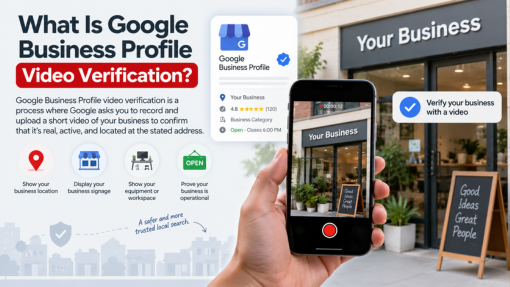
What Does Google Look for in a Verification Video?
Think about your video. Ask yourself these three simple questions:
1. Where is your business?
For a shop or a business that sells both online and in-person, show what is around your store. You can take photos of street signs, building numbers, places next to you, or things people know in the area. This will help Google know your real place matches what you put on your Business Profile.
2. Does the business actually exist?
Show proof like your business signs that stay up for a long time, your shopfront, showroom, tools, products, or the place where you work.
For stores, the name you show on your sign should be the same name that you use on your Business Profile. This helps people know they are in the right place.
3. Do you manage or represent the business?
You need to show that you get to go in the business or do things that prove you manage it. This can be things like opening a cash register. You may go in spots where only people who work there go. You can use the point-of-sale system, run the equipment, or get into parts of the business that are not for regular people.
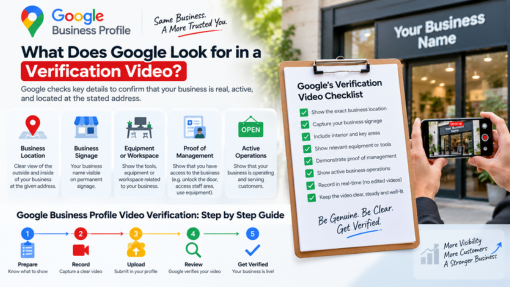
What Should You Show Based on Your Business Type?
Storefront Businesses
When people come to your place, start by showing them the area and any helpful signs. Then, point out your main business sign. After this, take them inside and show how the business works. Tell them who can come in to help keep things going.
Keep all the proof together in one long recording.
Service-Area Businesses
Many businesses that work in one area often feel confused. The reason is, they do not have a shop for people to visit.
Google says that these businesses can show they are open in many ways. You can use work tools, machines, things you sell, your work area, business cards, clothes with your company name, or even cars that have your company name on them. You can also prove you run the business by doing the work or by using things that only your company uses.
If you do your work at home, you should be careful. Do not share any private information if you do not need to.
Hybrid Businesses
A business like this helps people at its own spot. It also helps people when they are not at that spot. A good example is a restaurant. You can eat there, or you can get your food sent to your home.
Your video needs to show the business itself. You also have to show clear proof that you run it.
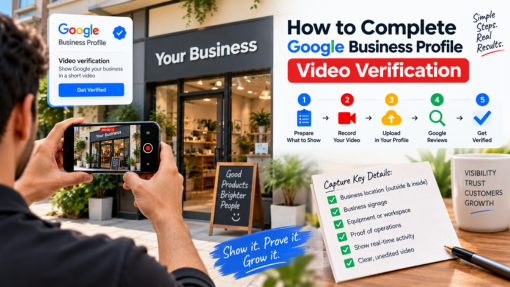
How to Complete Google Business Profile Video Verification
Step 1: Prepare Before Recording
First, look at the details in your Business Profile. Make sure you have your place, your signs, your tools, your work space, and any other proof you need with you.
Make sure your phone lets apps use location, camera, and sound. You need to give your phone these permissions.
Step 2: Start Verification From Your Business Profile
Open the Business Profile on your phone. Then, tap Get verified. If you see that Google gives you the way to use video check, do what you see on the screen to start your video.
You cannot just upload an old video or one you saved before. Google wants to get the video while you are going through the steps in real time.
Step 3: Record One Continuous Video
Show the proof that works for your kind of business. Do not cut or change the recording.
Before you finish, take some time to look at the video closely. Make sure you can see all the things you need in it.
Step 4: Submit and Wait for Review
After you upload the video, Google looks at it. This can take up to five work days. If Google does not accept your video, they tell you the reason. You will then have a chance to make a new video that fits what is missing.
Common Google Business Profile Video Verification Mistakes
Many times, when you check something, the problem is that there is not enough proof. It's not that the video is bad.
Avoid these common mistakes:
- Recording a pre-made video instead of recording through the verification process
- Editing or cutting the recording
- Failing to show clear location evidence
- Showing signage that doesn't match the Business Profile name
- Not demonstrating business operations
- Failing to show proof that you manage or represent the business
- Showing sensitive personal or financial information
- Recording other people's faces without necessity
Google tells you not to add any private items in your content. This means things like bank numbers, tax numbers, or ID numbers.
❌ Google Business Profile Video Verification Failed?
Do not send in another video until you know what did not work last time.
If Google says no to your video, check the reason they tell you. Try to see what proof you need. They might say your business name is not clear. They may say you do not show enough proof that the business is in the area and they might also say there is no proof that you run the business.
Digital Dhanu can look at your case and show you what you need to do before you send your details again.
Stuck With GBP Verification?
Get expert help from Digital Dhanu and know what to do next.
Connect with a Digital Dhanu GBP Expert.
Before You Submit Your Verification Video
Use this quick checklist:
✓ Your Business Information is right
✓ People can see where you are
✓ Your business sign can be seen if you have one
✓ Your business name is the same as the one needed
✓ Your place or tools can be seen
✓ You show who controls the business
✓ Your video is being taken live with no breaks
✓ You did not change the video
✓ You did not show private information
✓ You watched the whole video before sending it
Download Free PDFFree 15-point GBP Video Verification Checklist
Should You Verify Your Business Yourself or Get Expert Help?
If your business is easy to understand and you have the needed proof, you can do this by yourself.
Expert assistance can be useful when:
- Google has already said no to your video.
- You have tried to get checked many times.
- You are not sure what proof to show.
- You run a business that works in different areas.
- Your business does not have signs up all the time.
- You do not know why Google is asking for you to get checked.
The goal is not to make checking tough. It is to help you see what Google looks for before you send something.
Why Choose Digital Dhanu for Google Business Profile Help?
Digital Dhanu helps people and companies use Google Business Profile. The team also helps with local SEO. They help get accounts checked and seen online. They say they have helped businesses in over 70 cities. Now, they work with more than 7 countries. This means they get practice with many types of companies. They also learn the way people look for things online.
If you have trouble with checking your Google Business Profile, having someone else check the problem can make it easier. This shows you what you need to fix, so you do not need to send unfinished videos again and again.
Frequently Asked Questions
Google says that it can take up to five business days to look over your video after you send it.
Google wants the video to be at least 30 seconds long. The video must be one full recording with no edits. You have to show all needed proof for your type of business in the video.
Common problems can come up if you do not have proof of your location. If the business sign is hard to see or missing, that is also a problem. It is an issue if you do not have enough proof that the business is really there. You need proof that you work for the business or run it. Google will tell you the reason why your video is not taken.
Yes. Google lets Service Area Businesses use video to show their info. Your business may have to show where you work, what tools or things you use for your work, your work area, things with your brand, and proof that you run the business.
If your video does not play, Google says you need to look at the problems they show you. It is better to make a new video with the things you missed. Do not just record the same video again.