Can you really rank a GMB profile in one month? Yes, if the profile is incomplete and the competition is moderate, which describes most local businesses in India. We did exactly that for a client’s service business: within 30 days the listing moved into the Google Maps 3-pack for its main searches, phone calls rose by 120% and direction requests by 75%. This post shows the 12 steps we used, in the order we used them, so you can rank a GMB profile in one month yourself or know what to ask for.
We are careful with promises. For example, a business in a crowded category with 200-review competitors will not jump to the top in four weeks, and anyone who says otherwise is selling something. However, most profiles we audit are nowhere near their ceiling. They have the wrong category, a thin description, no posts and, above all, a handful of reviews. For those, one focused month changes everything, and this case study shows how.
Where the listing started
The client had claimed the listing a year earlier and then forgotten it. The primary category was a broad one that did not match the main service. Moreover, there were six photos, all of the signboard. The description was two generic sentences, the service list was empty, and the last post was from the previous Diwali. In short, Google had no reason to show it, so it sat outside the top ten for every search that mattered.
Free Google Business Profile Audit — No Payment, No Contract
Send us your profile link and within 24 hours you get a written audit showing exactly what is holding your rankings back:
- Who is outranking you inside your own 3 km — and why
- Category, map pin, photo and review gaps on your listing
- The 3 fixes that will move your calls first
Call or WhatsApp +91 8130854678 | WhatsApp us | Request the audit
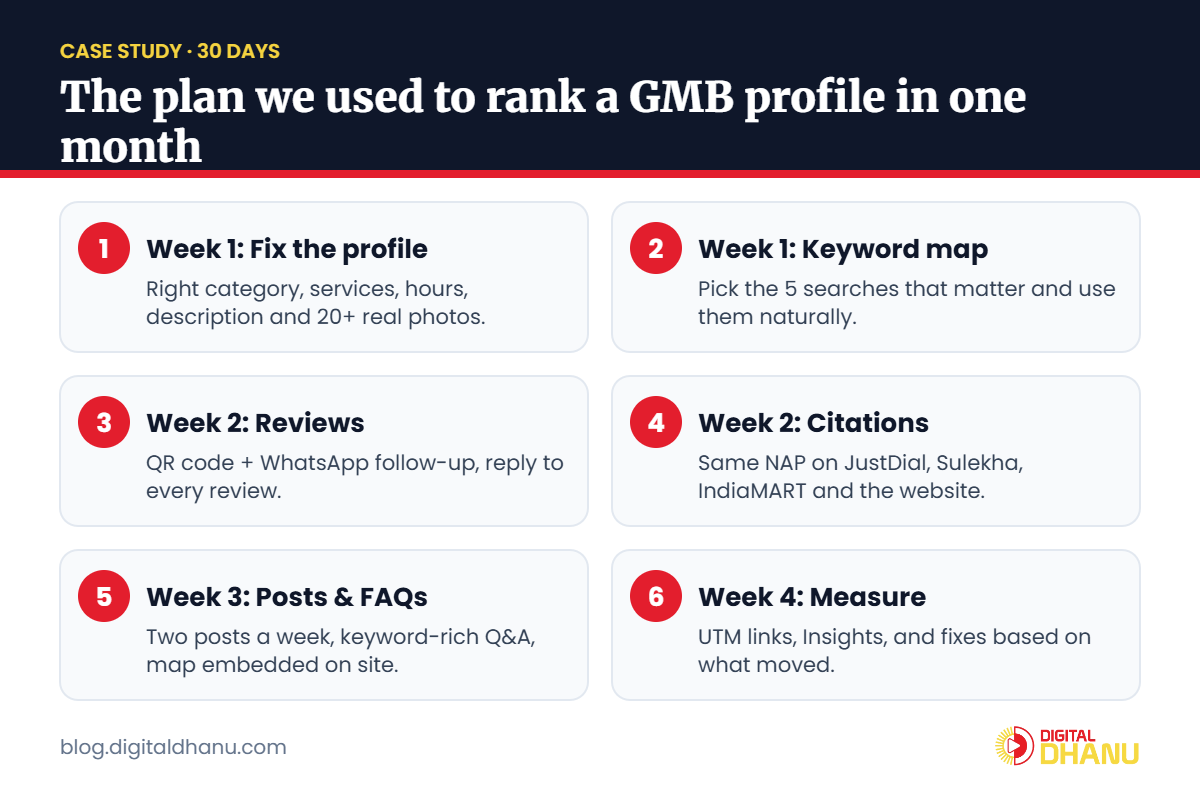
The 12 steps we used to rank the GMB profile in one month
Order matters here, because reviews and posts on a broken profile are wasted effort. So the foundation came first. Then we built the signals Google rewards, and finally we measured.
Steps 1–6: build the foundation
- Complete and correct the profile. We changed the primary category to the specific service, added four secondary categories, filled the service list with prices, set accurate hours and wrote a description that said what the business does and where.
- Map the keywords. Using Google autocomplete, Keyword Planner and the People Also Ask boxes, we picked five searches with real volume and used them naturally in the description and services. No stuffing in the business name, which is the fastest route to suspension.
- Add real photos. Twenty new photos of the premises, the team at work and finished jobs, uploaded over two weeks rather than in one burst. We still geo-tagged them, although Google now strips that data, so the photos themselves are what count.
- Start weekly Google Posts. Two posts a week: one offer, one piece of proof such as a completed job or a customer story.
- Build a review system. A QR code at the counter and a WhatsApp message after every completed job. Customers were asked to mention the service they used, and every review got a reply within a day.
- Fix the citations. The name, address and phone number were made identical on JustDial, Sulekha, IndiaMART, Facebook and the website. Two old duplicate listings were removed.
Steps 7–12: add signals and measure
- Embed the map on the website. A simple embed on the contact page, with the same address text underneath.
- Speed up the site. Compressed images and caching took the mobile load time under three seconds, because a slow site weakens the profile’s website clicks.
- Add keyword-rich FAQs. Six questions customers actually ask, answered on the profile Q&A and on the website.
- Track with UTM parameters. The website link in the profile carried UTM tags so Google Analytics could separate Maps traffic from everything else.
- Promote on social media. Each Google Post was shared on Instagram and Facebook with a link to the profile, which brought in early views and a few reviews.
- Monitor and adjust weekly. Every Monday we checked the Performance tab, replied to new questions and fixed anything that had slipped.
What moved, week by week
| Week | What we did | What moved |
|---|---|---|
| Week 1 | Category, services, description, hours, first 10 photos | Profile started appearing for the exact business name plus service |
| Week 2 | Review system live, citations corrected, 10 more photos | First page of Maps for two of the five target searches |
| Week 3 | Posts, FAQs, map embed, site speed fixes | 3-pack for the main service in the home locality |
| Week 4 | UTM tracking, social promotion, weekly review | 3-pack held, calls and directions up sharply |
Want us to rank your GMB profile in one month?
WhatsApp us your business name and city. We will tell you honestly whether a 30-day plan is realistic for your category.
Results after one month on the GMB profile
As a result, compared with the 30 days before we started, the profile recorded a 120% increase in phone calls, a 75% increase in direction requests and a 90% increase in website visits from Maps. Equally important, it entered the local 3-pack for the main service in the client’s locality and stayed there in the following months as reviews kept coming.
Why it worked so fast: the profile was starting from almost nothing, so every fix was a big relative gain. If your profile is already half-decent, expect the same steps to take two to three months, as we explain in how to rank on Google Maps in India.
Tools we used
- Google Business Profile Manager for every profile change and the Performance tab.
- Google autocomplete, Keyword Planner and Google Trends for keyword research.
- Google PageSpeed Insights for the website speed fixes.
- Canva for post images, and Google Analytics with UTM parameters for tracking.
Mistakes that stop a GMB profile from ranking in month one
In fact, we see the same handful of problems in almost every audit. Avoid these, and as a result you are already ahead of most competitors.
- An incomplete profile with empty services or a vague description.
- Different phone numbers or addresses across directories.
- Ignoring negative reviews instead of replying calmly and fixing the issue.
- Keywords stuffed into the business name, which invites suspension.
- Uploading 30 photos in one day and then nothing for months.
- Measuring nothing, so you never know which change brought the calls.
If your listing has disappeared entirely rather than just ranking low, read why your business is not showing on Google Maps first. For the review side of the plan, how many reviews you need to rank on Google Maps gives realistic targets. Google’s own advice on improving local ranking is short and worth reading too.
In short: to rank a GMB profile in one month, fix the foundation in week one, build reviews and citations in week two, add posts and FAQs in week three, and measure in week four. The steps are simple; the discipline is the hard part.

Written by Dhanu Singh, Founder & Managing Director, Digital Dhanu
Google Business Profile and local SEO specialist based in Noida. Since 2019, Dhanu and his team have helped 1,300+ businesses across India, Dubai and Australia get found on Google Maps and turn that visibility into enquiries. Meet the team.
Ready to Rank Your GMB Profile?
Message us today and we will share a 30-day plan for your business, honest pricing and the report you will get every month.
Rank Your GMB Profile with Digital Dhanu
Free consultation — a realistic plan for your category, honest pricing, no pressure.
Frequently Asked Questions
Can every business rank a GMB profile in one month?
No. It works when the profile is incomplete and competition is moderate, whereas in crowded categories with strong, well-reviewed competitors the same steps usually take two to three months.
How many reviews did the profile need?
The client went from a handful of reviews to a steady two or three a week. Consistency mattered more than the total, because Google rewards recent, genuine reviews with replies.
Do geo-tagged photos still help ranking?
Not directly, because Google strips location data from uploaded images, so geo-tagging is harmless but not a ranking factor. Real, recent photos of your business are what help.
What is the most important step of the twelve?
The primary category. If it is wrong, nothing else works, because Google will not show you for the searches you want.
How much did it cost?
Costs depend on the category and the number of locations, so we share a written scope before any work starts. That way you know exactly what the month includes.