How do you remove bad reviews from Google My Business? To remove bad reviews from Google My Business, open your Business Profile, find the review, click the three dots and choose “Report review”, then select the policy it breaks. Google removes reviews that are fake, spam, off-topic, written by competitors or employees, or abusive, usually within three to seven days. However, a genuine negative review from a real customer cannot be deleted, so the realistic plan is to remove what breaks the rules, reply well to what does not, and bury the rest under fresh five-star reviews.
One angry one-star review at the top of your profile costs you customers every single day, silently, before they ever call. We handle this for businesses across Delhi NCR and the rest of India, and the first thing we tell every owner is the same: Google will not delete a review just because it is bad for you. Because of that, the fight is won in two places, the report form and the reply box. So here is how to use both.
Which bad reviews Google will actually remove
Google’s review policy is the only thing that matters here. In short, a review is eligible for removal when it fits one of these categories.
Free Google Business Profile Audit — No Payment, No Contract
Send us your profile link and within 24 hours you get a written audit showing exactly what is holding your rankings back:
- Who is outranking you inside your own 3 km — and why
- Category, map pin, photo and review gaps on your listing
- The 3 fixes that will move your calls first
Call or WhatsApp +91 8130854678 | WhatsApp us | Request the audit
| Type of review | Removable? | What to select when reporting |
|---|---|---|
| Fake review from someone who never visited | Yes | Spam or fake content |
| Competitor or ex-employee review | Yes | Conflict of interest |
| Abuse, threats, hate speech | Yes | Harassment or hate speech |
| Review about a different business or location | Yes | Off-topic |
| Contains phone numbers, links or ads | Yes | Advertising or solicitation |
| Honest complaint about slow service or price | No | Reply instead |
Step-by-step: remove bad reviews from Google My Business
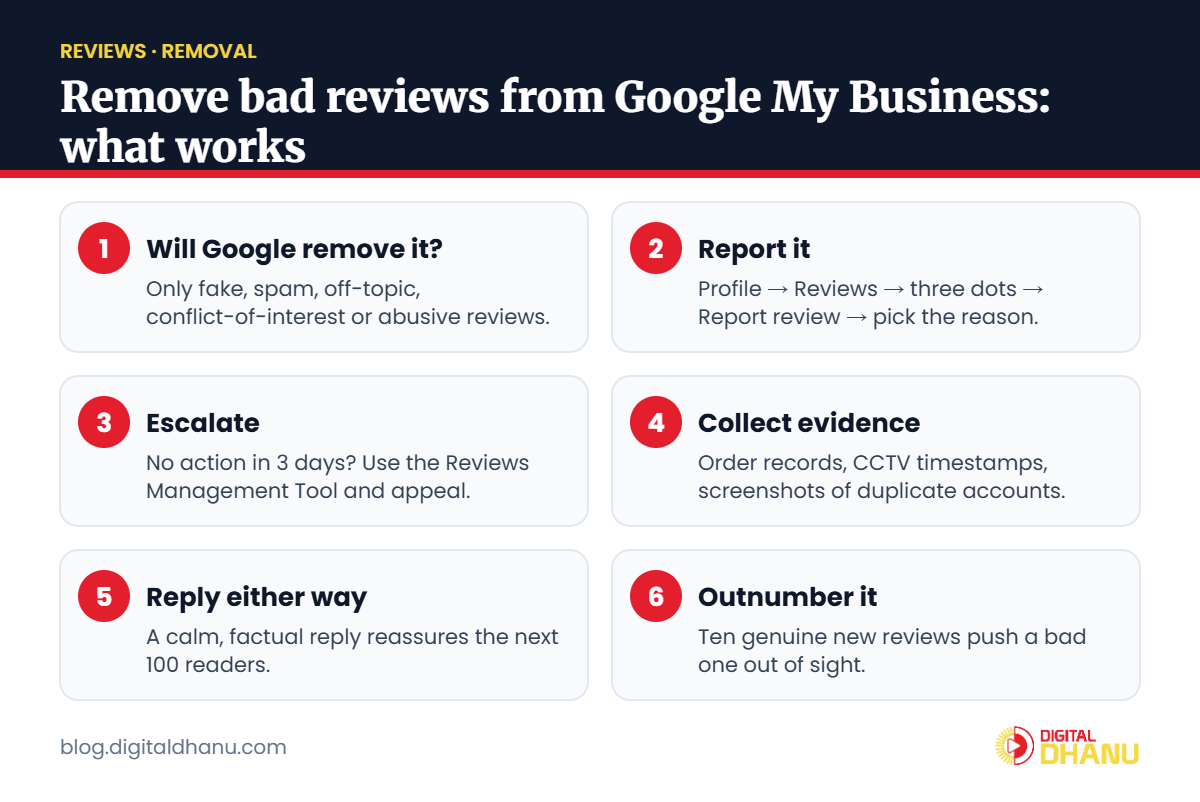
- Open the review in your profile. Search your business name on Google while signed in, click “Read reviews”, and find the one you want removed.
- Report it. Click the three dots next to the review, choose “Report review”, and select the single most accurate reason. Picking a vague reason is the most common cause of a rejected report.
- Report it from other accounts too. Ask two or three team members to report the same review from their own Google accounts. Multiple reports from different users are weighed more heavily.
- Wait three working days. Google emails a decision to the profile owner, and many clear-cut spam reviews disappear within 72 hours.
- Escalate through the Reviews Management Tool. If nothing happens after that, open Google’s Reviews Management Tool, check the status of your report, and submit a one-time appeal with your evidence attached.
- Keep records. Screenshots of the review, the reviewer’s profile, your order history or CCTV timestamp if they claim to have visited, and any threats sent to you directly.
Evidence that wins appeals: proof the person was never a customer, a screenshot showing the same account left identical reviews on five unrelated businesses, or a message where the reviewer demanded money or free service. Keep it factual and short; the reviewer reads nothing you send to Google.
Want us to handle the reports and appeals?
WhatsApp us the review link. We will tell you honestly whether it can be removed and handle the reporting, escalation and reply if it can.
When Google refuses to remove bad reviews: the reply strategy
Of course, most negative reviews are genuine, and Google keeps them. That is not the end of the story, because the reply is read by far more people than the review itself. In fact, a calm, specific reply turns a one-star review into proof that you take customers seriously.
- Reply within 24 hours; speed is part of the message.
- Thank them, state the facts briefly, and say what you changed. No arguing, no sarcasm.
- Move the conversation offline: “Please call me on this number so I can fix it personally.”
- Never mention their name, order details or anything private.
- If the complaint was fair, fix the problem and ask them to update the review in a week.
Then outnumber it, because ten genuine new reviews in a month push the bad one down the list and lift your average. Our guide on how to get more Google reviews gives the WhatsApp templates we use for exactly this. Moreover, if your reviews are vanishing rather than piling up, read why Google Business Profile reviews stop showing first, since that is a different problem with a different fix.
Mistakes that make bad reviews worse
- Replying angrily or accusing the reviewer of lying in public.
- Buying positive reviews to drown out the bad one; Google detects the pattern and may suspend the profile.
- Reporting a review five times from the same account, which looks like abuse of the system.
- Deleting and recreating the profile to “start fresh”. The reviews follow the location, and you lose your history.
- Ignoring it. Silence reads as guilt to the next hundred people who search for you.
If the situation has already led to a suspension, our guide to fixing a suspended Google Business Profile explains the reinstatement process. For ongoing protection, the Google Business Profile management service includes weekly review monitoring and replies.
In short: you can remove bad reviews from Google My Business only when they break Google’s policy, and reporting precisely with evidence is what gets them removed. For the honest ones, reply fast and well, then let a steady stream of real reviews do the rest.

Written by Dhanu Singh, Founder & Managing Director, Digital Dhanu
Google Business Profile and local SEO specialist based in Noida. Since 2019, Dhanu and his team have helped 1,300+ businesses across India, Dubai and Australia get found on Google Maps and turn that visibility into enquiries. Meet the team.
Let’s Protect Your Rating and Your Leads
Message us today and we will share a clear plan, honest pricing and the report you will get every month.
Talk to a GMB Expert Today
Free review audit — we check what can be removed, what needs a reply and how to rebuild your rating.
Frequently Asked Questions
How long does Google take to remove a reported review?
Usually three to seven days, although clear spam can disappear within 72 hours, while reviews that need manual checking can take two to three weeks, especially after an appeal.
Can I remove a genuine negative review from Google My Business?
No, because Google only removes reviews that break its policies. A real customer’s honest complaint stays, so the practical response is a good reply and more positive reviews.
Can I pay a service to delete Google reviews?
Nobody can delete reviews on your behalf; only Google can. Instead, a legitimate service reports, escalates and appeals properly. Anyone promising guaranteed deletion is either lying or using methods that risk your profile.
Should I reply to a fake review while waiting for removal?
Yes. Reply once, calmly, stating that you have no record of the person as a customer and have reported the review, so readers understand what that means. that you have no record of the person as a customer and have reported the review. Readers understand what that means.
What if the reviewer is a competitor?
Report it as a conflict of interest and, above all, attach evidence, such as the reviewer’s profile showing their own business or reviews of only your competitors. These reports succeed more often than most.