

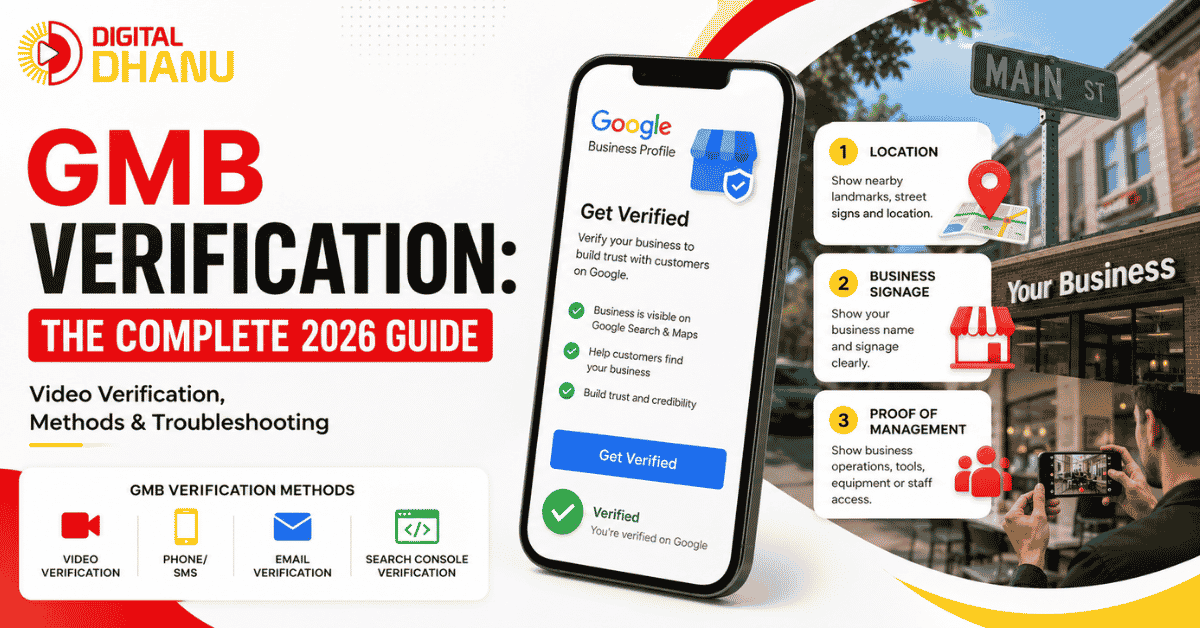
GMB Verification: The Complete 2026 Guide (Google Business Profile)
You’ve created your Google Business Profile, filled in all the details — but GMB verification is still pending; it shows “Not verified”, and you’re nowhere to be found in search? This happens to almost every new business owner, and I help people through it every single day.
Here’s the good news: verification isn’t hard — you just need to know the right approach, especially because Google changed the process quite a bit in 2026.
In this guide, I’ll walk you through exactly what I’ve learned verifying 100+ business profiles — which method to use, how to pass video verification, and what to do if it fails.
1,300+
businesses served
Top 3
Map Pack goal
30 Min
reply time
Quick Answer: What Is GMB Verification?
Google Business Profile verification is the process where Google confirms that your business is real and located where you say it is. In 2026, the most common method is video verification — you record a short, continuous video on your phone showing your location, signage, and business operations. Google reviews it (usually within 5 business days) and then verifies your profile. The other methods are phone, email, and Search Console — but these only appear when Google offers them.
Important: Google does not let you choose your method. It decides based on your business type, location, and history. So different businesses will see different options.
Why Is Verifying Your GMB So Important?
Without verification, your profile is incomplete. Only after verifying can you:
- Appear in Google Search and Maps (without verification, visibility is very limited)
- Edit your business details (hours, phone, address)
- Respond to customer reviews
- Post updates, photos, and offers
- See your performance insights (how many people are viewing you)
In simple terms — without a verified profile, you don’t really exist on Google. That’s why this is the first and most important step.
Free Ranking Checklist
15-point Google Maps checklist (PDF)
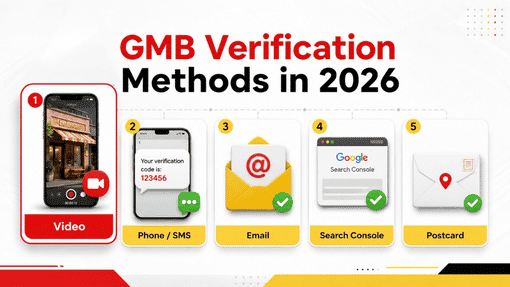
GMB Verification Methods in 2026
Google uses these methods in 2026. Remember — you can’t choose; Google decides:
1. Video Verification (most common)
This has become the default method, especially for new businesses and service-area businesses. You record a continuous (unedited) video on your phone showing three things — your location, your signage, and proof that you operate there. Full details are below.
2. Phone / SMS Verification (fastest)
Google sends a code via automated call or text, which you enter in your dashboard. This is almost instant — but it’s usually reserved for businesses that already have a strong online presence.
3. Email Verification
In some cases, Google sends a verification link to your business email. It’s less common, but it happens. The email usually arrives within a couple of minutes.
4. Search Console (Instant) Verification
If your website is already verified in Google Search Console, you may qualify for instant verification. Not everyone gets this, but when available, it’s the easiest option.
5. Postcard Verification (now rare)
This used to be the main method — Google would mail a postcard with a code to your address. In 2026, this has become rare, especially for service-area businesses. If you’re looking to “verify without a postcard,” you’ll most likely be given video or phone verification instead.
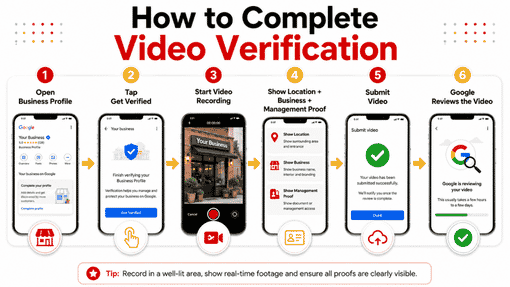
How to Do Video Verification (Step-by-Step)
Since video is the most common method, let’s understand it in detail. I’ve noticed this is exactly where people go wrong — so read carefully.
- Open your profile and tap “Get Verified” — from Google Search or the Maps app, open your profile and click “Get verified.”
- Google shows you an option — only the method Google wants will appear. If it’s video, you’ll see a “Record a video” option.
- Start recording from your phone — the video must be recorded inside the flow itself, on mobile. A pre-recorded video will not upload.
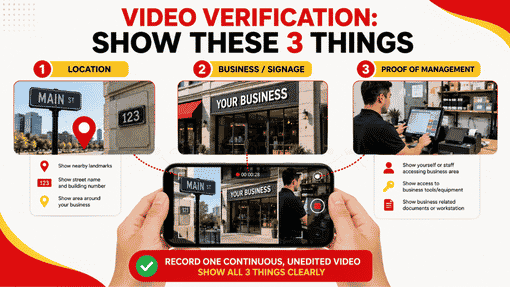
- Show these 3 things, in order:
- Location — start from outside. Show street signs, the building number, nearby shops, and landmarks (the ones visible on Google Maps)
- Signage — show your business board/name (permanent signage that displays your business name)
- Proof of operation — go inside, open the door, show your equipment/counter/stock — anything that proves you actually work there
- In one continuous take — don’t cut in the middle, don’t edit. Google wants a single uninterrupted video.
- Submit and wait — Google will review it, which can take up to 5 business days. The result comes to the email linked to your profile.
Pro Tip (from my experience): Keep the video 60–120 seconds — shorter videos have fewer upload glitches and Google’s system processes them faster. And record during quiet hours — there should be no background noise or other people talking.
What If Video Verification Fails?
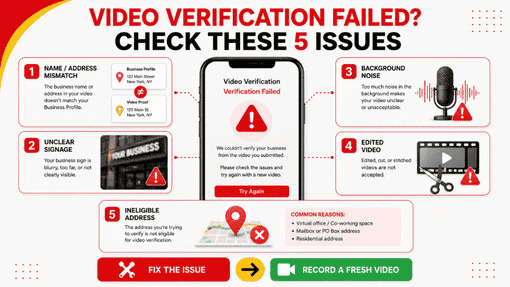
This is the most common problem people come to me with. If you get a “Review issues” or “Not successful” message, don’t panic. Google often gives a reason (sometimes it doesn’t). Check these:
- Name or address doesn’t match — the signage in your video must exactly match the name on your profile
- Signage wasn’t clear — the board was blurry or not visible
- There was background noise — people talking or other sounds
- The video was edited — a cut or trimmed video gets rejected
- The address itself isn’t eligible — PO boxes, shared offices, or addresses that break Google’s guidelines will never verify (this is the most important one — no video can fix this)
What to do: Fix the cause, and submit a fresh recording. Don’t resubmit the same video — it won’t change anything.
Common Mistakes (that I see again and again)
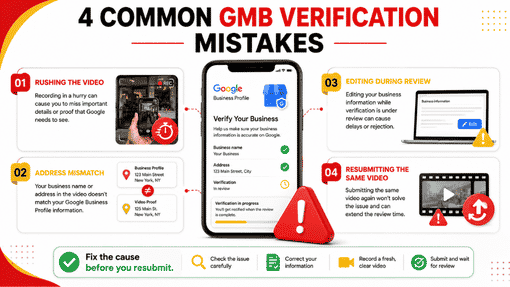
From my experience, these are the mistakes people make most often:
- Rushing the video — recording without preparation and missing the essential elements
- Address mismatch — one thing on the profile, something different on the board
- Editing the profile during verification — while the review is in progress, don’t touch the profile, or the process can reset
- Resubmitting the same video — sending the same clip again after a failure without fixing the reason
Free GMB Hacking Tips
15-point Google Maps checklist (PDF)
FAQ — Frequently Asked Questions
Q: How long does GMB verification take?
Video verification can take up to 5 business days for Google to review. Phone verification is almost instant, and email arrives within a couple of minutes.
Q: Can I verify without a postcard?
Yes, in 2026, most businesses are given the video or phone method, as postcards have become rare. But remember, Google decides the method, not you.
Q: Can I choose my verification method?
No. Google automatically decides based on your business type, location, and history. You can’t manually change it.
Q: How long should the verification video be? 60 to 120 seconds is best. Google allows up to 5 minutes, but shorter videos have fewer technical problems.
Q: My video failed — what do I do now?
Check the reason (name/address mismatch, signage, noise, edited video), fix it, and record a fresh video. Don’t resubmit the same one.
Q: Can my profile work without being verified?
You can verify later, but an unverified profile has very limited visibility on Google, and you can’t edit it. So it’s better to verify early.
Need Help Verifying Your Profile?
Verification can be confusing — especially if your video keeps failing or you can’t get the right method. My team and I have verified and ranked 1,300+ businesses across India, Australia, and Dubai.
Let’s do a free audit of your profile — we’ll show you exactly what’s wrong and how to fix it.
👉 [Get Your FREE GMB Audit] — check your profile now 📱 Talk on WhatsApp
Related Reading
- GMB Video Verification: Step-by-Step Guide
- Google Business Profile Suspended? Reinstatement Guide
- How to Rank Your Google Business Profile